

In a prepared environment you’ll find built‑in visual and tactile cues—like matching shapes, colored markers, or reference sets—that let you instantly see if your work is correct and self‑correct without a teacher’s help. These cues create a feedback loop that encourages concentration, confidence, and autonomous problem‑solving. Mechanical controls force a correct fit, while perceptual cues let you compare and adjust. If you explore further, you’ll discover how these designs shape independence and learning.
Definition of Control of Error in a Montessori Prepared Environment

Ever wondered how a Montessori classroom lets children fix their own mistakes? In a prepared environment, control of error means every activity includes a built‑in reference that shows the right outcome. Montessori materials—like beads with bottom markers or puzzle pieces with control sets—embed feedback mechanisms that instantly signal correctness. You watch the child compare their work to the control, triggering a feedback loop that sparks self‑correction. This design turns error detection into a learning moment, not a call for adult rescue. The teacher role is limited to modeling the process once, then stepping back while the child pursues independent learning. By embedding error control, Montessori education cultivates concentration, confidence, and autonomous problem‑solving. Similarly, many child-safe learning tools incorporate training mechanisms to guide skill development while promoting independence.
Why Self‑Correction Is Central to Control of Error in Montessori Learning
In a prepared environment the built‑in reference points let you see instantly whether you’re right, and that immediate feedback fuels self‑correction. You work with Montessori materials that embed control of error, so each piece signals when it’s correctly placed. This visual cue lets you verify errors without adult help, turning every mistake into a learning moment.
Your independent learning deepens as you repeat the task, strengthening pupil concentration and intrinsic motivation. When you catch a slip, you correct it, reinforcing the skill through repetition learning. Teachers practice guided observation, stepping in only when the pattern of errors suggests a misunderstanding, preserving your initiative and the rhythm of the prepared environment. Modern educational tools often emphasize child-safety design, ensuring a supportive and secure learning experience.
Mechanical vs. Perceptual Controls of Error in Montessori Materials
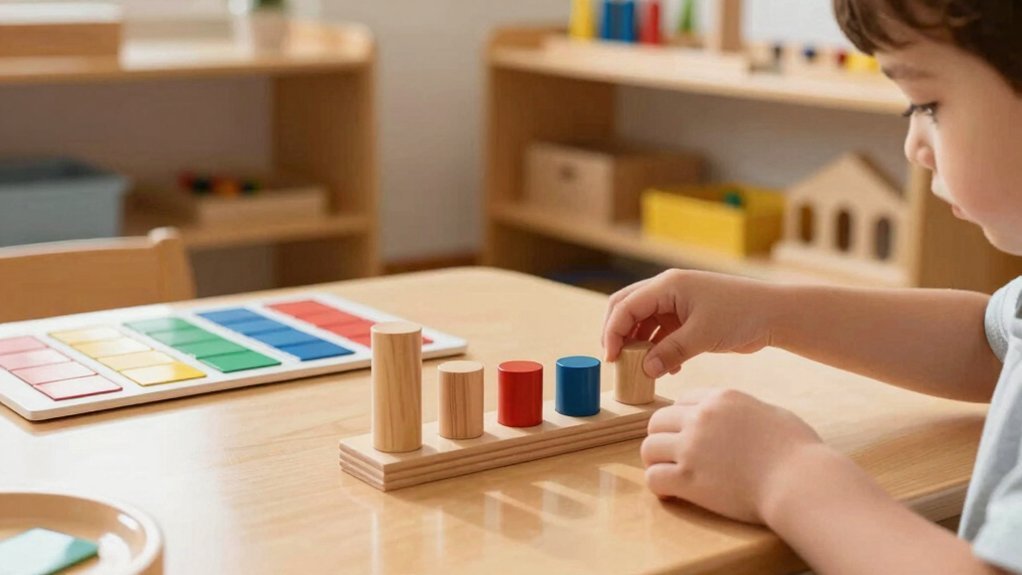
How do mechanical and perceptual controls of error differ in Montessori materials? Mechanical control relies on built‑in guidance that forces the correct fit—cylinder blocks, for example, have sockets that only accept the matching size, giving you immediate self‑check. Perceptual control, by contrast, uses sensory comparison; the Pink Tower invites you to gauge height and proportion, spotting mistakes through visual cues rather than physical blocks. Both strategies support error correction within prepared environments, yet they operate differently. Mechanical control offers feedback‑free guidance, while perceptual control cultivates self‑correction through observation. By integrating these approaches, Montessori materials empower you to identify and fix errors independently, strengthening concentration and reducing adult intervention. Additionally, employing natural, baby-safe materials in Montessori tools enhances sensory engagement and safety during error control activities.
Classroom Error‑Control Examples: Furniture, Breakables, Nomenclature Sets
Furniture, breakables, and nomenclature sets illustrate how prepared environments embed error‑control into everyday classroom activities. You see movable furniture that’s light enough for children to lift, encouraging intrinsic error detection as they adjust balance and avoid collisions. Breakables like glass pitchers teach careful pouring; when a spill occurs, the child self‑corrects, reinforcing classroom safety. Nomenclature sets come with a control set; after the teacher’s demo, you watch the child compare the working set to the control set, then let them independently verify their work. This cycle of self‑correction builds confidence and reduces reliance on constant teacher oversight.
- Movable furniture for kinetic error control
- Breakables for tactile self‑checking
- Control sets paired with nomenclature sets
- Intrinsic error detection through Montessori materials
- Safety in materials, such as smooth beechwood with rounded edges, further supports self-correction by minimizing hazards during independent exploration.
Built‑In Material Features for Control of Error Self‑Check

Ever wondered how a simple dot or number on the back of a material can turn a lesson into a self‑checking experience? In a prepared environment, Montessori materials and NAMC classroom resources embed tiny markers—colored dots, numbers, or symbols—on their undersides. When a child places a sound cylinder or a bead on a tray, they instantly compare the hidden indicator with the control set. This built‑in control of error creates intrinsic feedback, letting the learner verify matches without teacher intervention. The self‑checking design promotes self‑correction and independent learning, reinforcing the curriculum’s goals. By aligning each piece with the Montessori philosophy, NAMC ensures every classroom material becomes a portable error‑control tool, encouraging confidence and mastery through repeated, self‑guided verification. These materials often feature safe finishes and smooth edges, ensuring they are both educational and child-friendly.
Designing New Materials With Control of Error Mechanisms
You’ll embed self‑check mechanisms directly into the material so kids can instantly see if a piece fits, using visual cues like colored dots or matching shapes. By integrating physical indicators such as tactile markers or size cues, the design makes errors obvious without adult prompts. This progressive independence design lets children move from teacher‑guided checks to autonomous verification as they gain confidence. Including a variety of textures from smooth to rough can enhance sensory discrimination and deepen learning through texture variety.
Self‑Check Mechanisms
How can a material instantly tell a child whether an answer is right or wrong? You’ll see self‑correction in action when a Montessori material embeds a built‑in self‑check. The design creates a feedback loop that lets the child perform independent verification without adult prompting. Bottom markers on NAMC blackline masters act as visual cues, turning error‑control into a tactile, sensorimotor experience. In a prepared environment, the working set shows the task, then the control set lets the child confirm the result, reinforcing confidence and autonomy.
- Use colored bottom markers for instant matching.
- Align sensorimotor cues with numeric sequences.
- Provide a clear control set for independent verification.
- Embed a feedback loop that triggers self‑correction.
Ensuring the materials are designed with ergonomic handles and non-toxic, durable components can further enhance safe and confident use by children.
Physical Indicator Integration
Where do you place the cue that tells a child instantly if a match is correct? You embed physical indicators on the bottoms of Montessori materials—colored dots, numbers, or symbols—so the child can compare bottom markers without adult help. These markers become the core of the verification process, letting the child see whether the sound cylinder’s value aligns with its companion piece. By designing durable, visible cues, you create built‑in controls that support self‑correction and independent practice. The NAMC‑inspired design treats each indicator as an error‑control feature, turning every interaction into a mini‑assessment. In a prepared environment, this integration reduces reliance on teachers, reinforces learning loops, and keeps the child engaged in continuous, autonomous error detection.
Progressive Independence Design
Ever wondered how a new Montessori material can guide a child to self‑check without a teacher’s eye? In progressive independence design you embed error control directly into the material, letting the child compare a working set with a control set. The transparent feedback loop fuels autonomy and self‑directed learning, while the prepared environment stays safe and manageable.
- Use bottom markers that signal correct placement.
- Separate working set (trial) from control set (reference).
- Design lightweight, durable components for easy handling.
- Provide immediate visual or tactile feedback for self‑correction.
Teacher Role in Modeling, Observing, and Timing Intervention for Control of Error
The teacher first models the task with the working set, then lets the child verify using the control set so the child can practice self‑correction. Your teacher modeling creates a clear error control framework within prepared environments, using Montessori materials that invite guided practice.
You watch the child’s attempts, noting where the feedback loop signals a slip. Your observation tells you when to intervene—never before the child’s impulse to correct, but promptly enough to keep momentum. You time interventions so they support, not disrupt, independent learning.
When you re‑demonstrate, you focus on the process, not past mistakes, allowing the learner to refine self‑correction while you remain ready to guide if needed.
How Control of Error Builds Independence, Confidence, and Concentration
How does error control shape a child’s independence, confidence, and concentration? In a prepared environment, control of error lets you notice a mismatch, self‑correct, and move forward without adult prompting. The built‑in feedback of Montessori materials—bottom markers, color coding, and sizing cues—creates a self‑checking loop that fuels inner motivation. When you master a task solo, independence blooms, confidence rises, and concentration deepens, because the work feels purposeful rather than forced. The teacher role shifts to modeling and observing, allowing you to verify your own work.
- Immediate visual feedback reinforces correct matching.
- Self‑checking features reduce reliance on adult correction.
- Independent verification builds inner motivation.
- Sustained focus emerges from purposeful, error‑controlled tasks.
Frequently Asked Questions
What Does Control of Error Mean in Montessori?
You use error control in Montessori to let children spot and fix their own mistakes, relying on built‑in cues and self‑checking materials so you intervene only when truly needed.
What Is Control of Error in Pink Tower in Montessori?
You notice the tower’s size order: if a block’s dimensions don’t match the sequence, the stack looks unstable, so you correct it instantly, relying on visual feedback alone.
What Is a Control of Error?
You use control of error when materials give you built‑in cues—like matching shapes, colors, or numbers—so you can spot and fix mistakes yourself without adult correction.
What Is Error Control in a Network?
You use error control in a network to detect, correct, or retransmit faulty data packets, ensuring reliable communication by employing checksums, acknowledgments, and retransmission protocols that keep information accurate.